Hugues Thiebeauld
|
0
|
October 5, 2026


For organisations that operate sensitive mobile applications, one question comes up again and again: do we really know what our application does? And this is particularly sensitive when it goes to security considerations: is my mobile application well protected against attacks? Does the mobile application comply with best security practices ?
Frameworks like the OWASP MASVS tell you what should be verified, how sensitive data is stored, how credentials are handled, whether cryptography is sound, what leaves the application, whether a security control actually runs. The standard is clear. Answering it for your own application is where it gets expensive.
Today, most organisations answer these questions by sending the work out. When you need to know what happens to a credential after a user types it, or whether a control actually executes, you scope an engagement, wait for a specialist, and receive a report. If a new question comes up after that report lands, it often means another round.
There is nothing wrong with that model, deep expertise will always matter. But it puts a specialist between you and questions that are, in the end, your questions about your own application. You own the decision, yet you cannot interrogate the evidence yourself.
This post is about narrowing that gap: using an AI agent to let your own team ask those questions directly, in plain language, while keeping the depth and the evidence you would normally only get from a specialist engagement.

Static analysis remains an essential part of application security. It can identify insecure APIs, configuration problems, vulnerable components and suspicious pieces of code without executing the application.
But there is an important distinction between code that exists in the binary and code that is actually executed, that may even appear by magic at runtime only. This includes processes downloading code from the internet. Or a code that is so well encrypted/compressed that a static analysis tool will not help you spot the code, until it is decrypted/decompressed and loaded at runtime (only).
An application may contain several implementations of the same functionality. A library may be packaged but never called. Behaviour may depend on configuration, user interaction or information received from a backend.
Static analysis therefore gives one part of the picture.
Dynamic analysis complements it by observing the application while it runs. OWASP's Mobile Application Security Testing Guide treats static and dynamic analysis as complementary approaches and describes dynamic analysis as evaluating an application through its real-time execution.
This is particularly useful when the question is not simply:
"Is this function present?"
but:
"What actually happened when the user performed this action?"
The difficulty is that getting this information has traditionally been much harder.
Consider a mobile banking or authentication application. You may want to understand what happens when a user launches the application, accepts the privacy notice, enters an identifier and types a PIN using a scrambled on-screen keyboard. Getting to the interesting security event already requires multiple interactions. A security analyst normally has to reproduce the scenario, instrument the application, determine where to observe execution, collect the relevant information and understand enough of the application internals to know where to investigate next.
And if the analyst did not capture the right information at the right moment, the scenario may have to be reproduced again. Time Travel Debugging changes that workflow.
Instead of trying to anticipate every interesting event while the application is running, Epoch records the execution first.
The resulting trace becomes a persistent representation of what happened. It can then be searched and explored forwards or backwards, including instructions, registers, memory and activity across the recorded system. Epoch records at full-system level, so the investigation is not restricted to a single application process.
Record first. Ask questions afterwards.
That becomes particularly interesting when the investigator is an AI agent.
We wanted to explore another model: record the application's execution, preserve it as evidence, and let an AI agent investigate that evidence through natural-language prompts.
We tested this approach on an Android application running inside a full-system Android environment. The objective was deliberately different from a conventional reverse-engineering exercise. We did not want an expert manually operating the application and guiding every step of the investigation.
Instead, we wanted to see how much of the workflow could be driven through AI prompts, from reproducing the user journey to analysing the resulting execution. The application is a banking application running in France.
The input was the binary file lappli-sg-5-18-4.apk. We found it on the internet. Once given to Epoch, the prompt was simply:
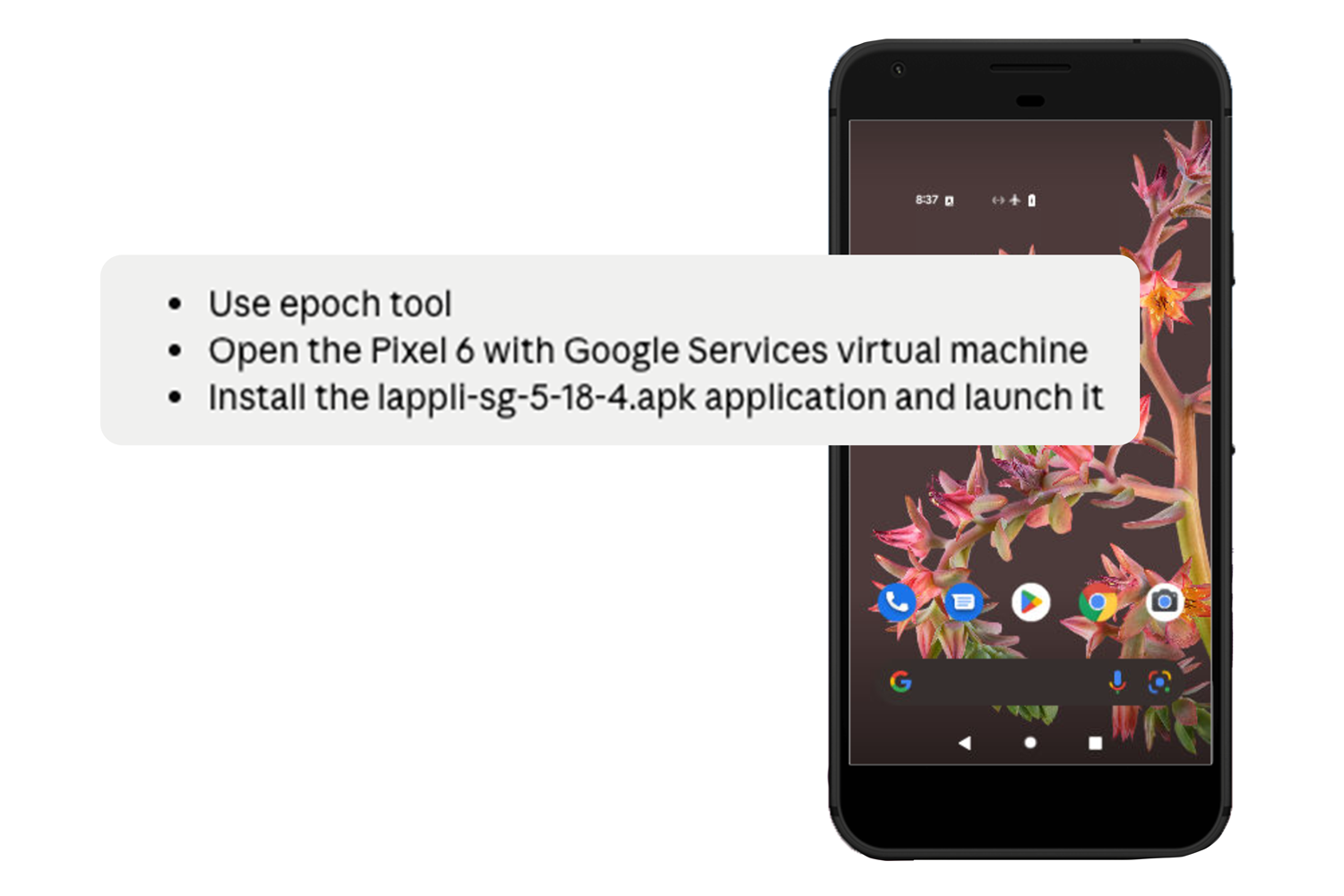
Once done, it is possible to simply manage all user interactions using a prompt. Here the idea was to execute the first pages from a fresh installation, that was a succession of clicks at different levels, with the aim to clean the initial setup sequence. This was managed by this prompt:
This prompt could be managed with language-based description only. Some may be providing AI agents with screenshots of the mobile applications to better run some sequence.

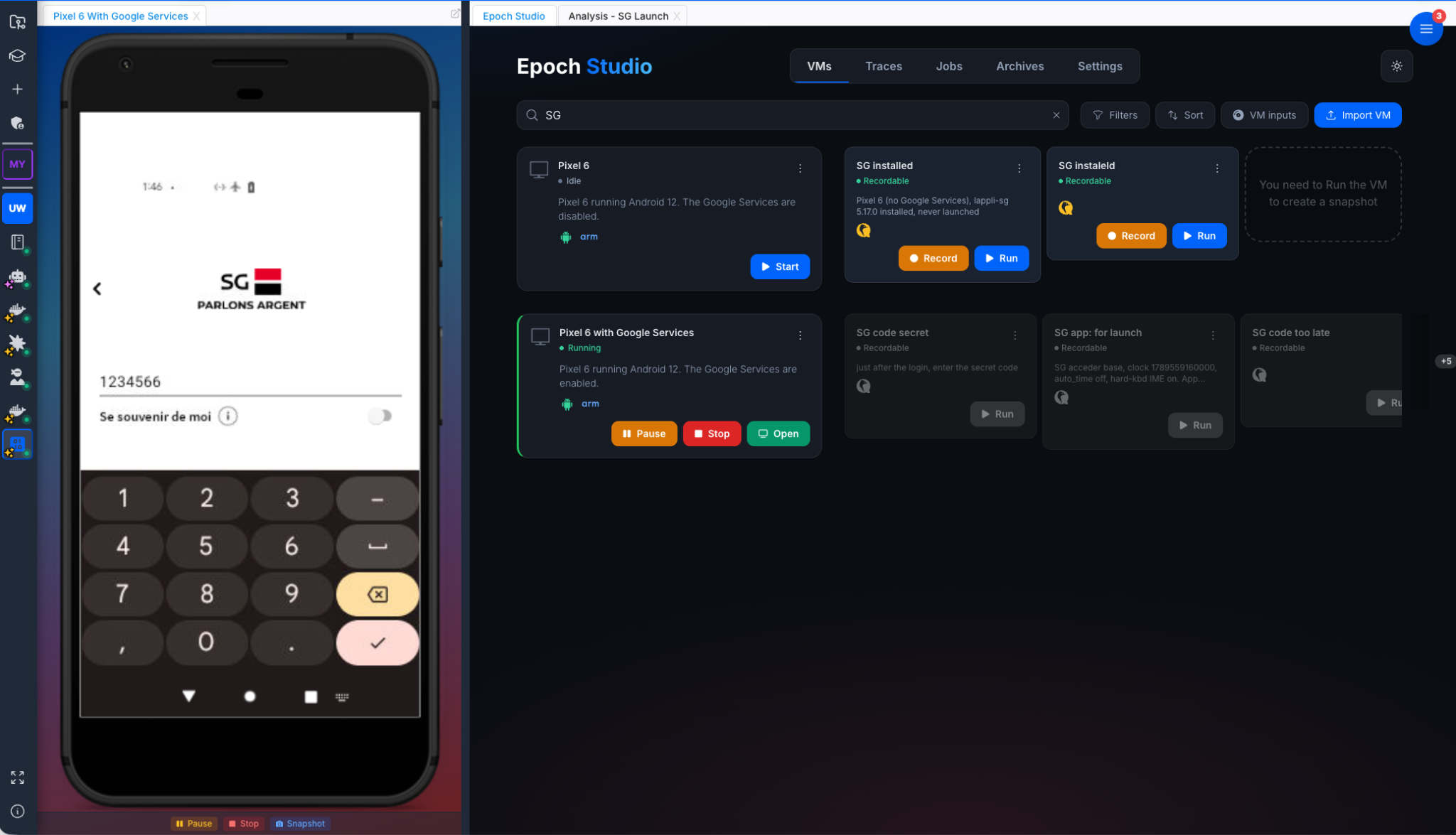
I could check on Epoch studio the different steps by just observing the AI doing the right things on the screen.
Here below are extracts of the different steps requiring zero manual operation:
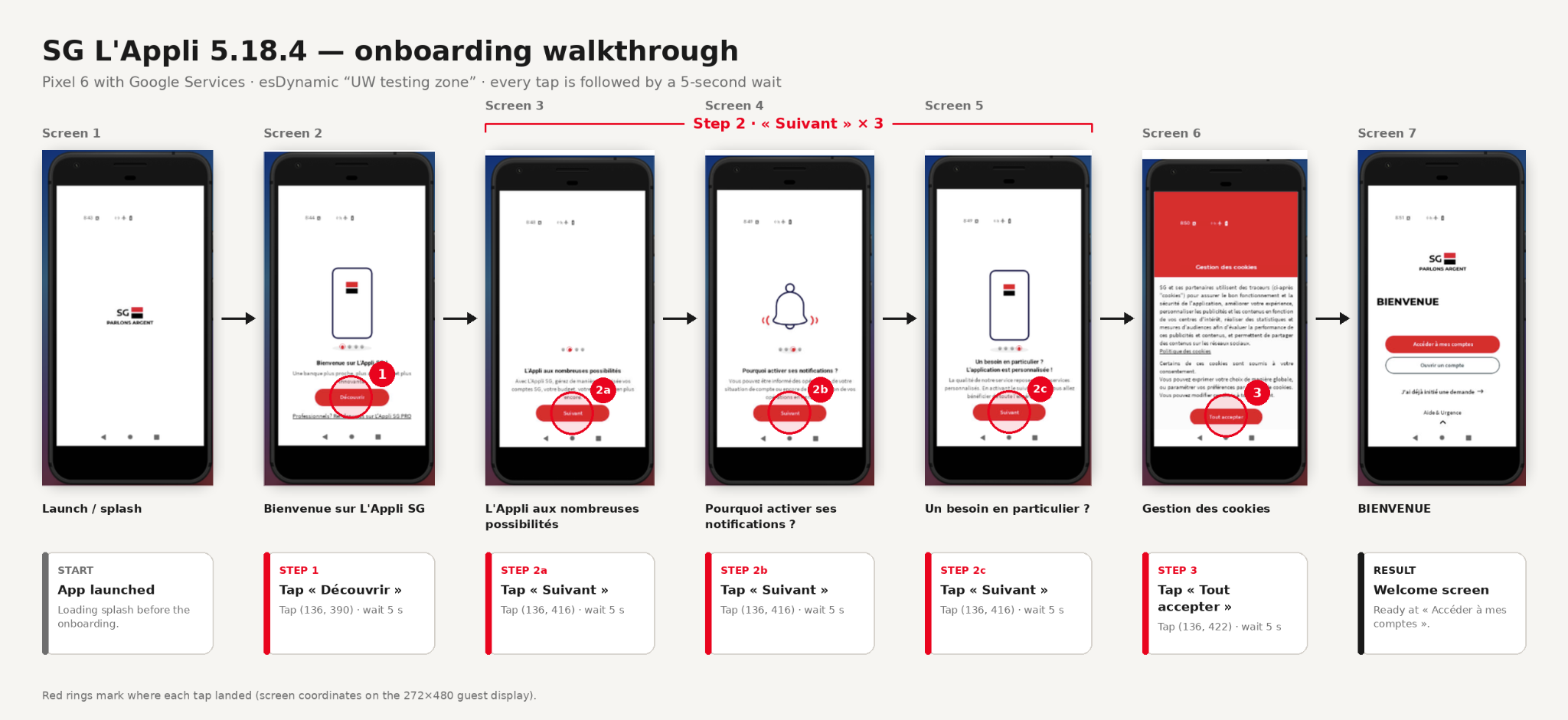
It is worth noting that all of these prompts can be done once, and replicated as long as the sequence of user interactions remains the same. The idea of systematic testing within an internal CI/CD can therefore be considered.
Second remark: every step can be frozen at given times. This is a snapshot. It means that it is possible to launch this corresponding snapshot from given states without having to do it from the beginning.
At this stage, we did not create any data, but just set up an environment. We created two traces.
This first record focused on what happened during a normal application launch.
The resulting full-system trace counted approximately 4.83 billion instructions. That size illustrates one of the interesting properties of this approach. Hundreds of gigabytes of execution data would be unrealistic for someone to inspect manually from beginning to end.
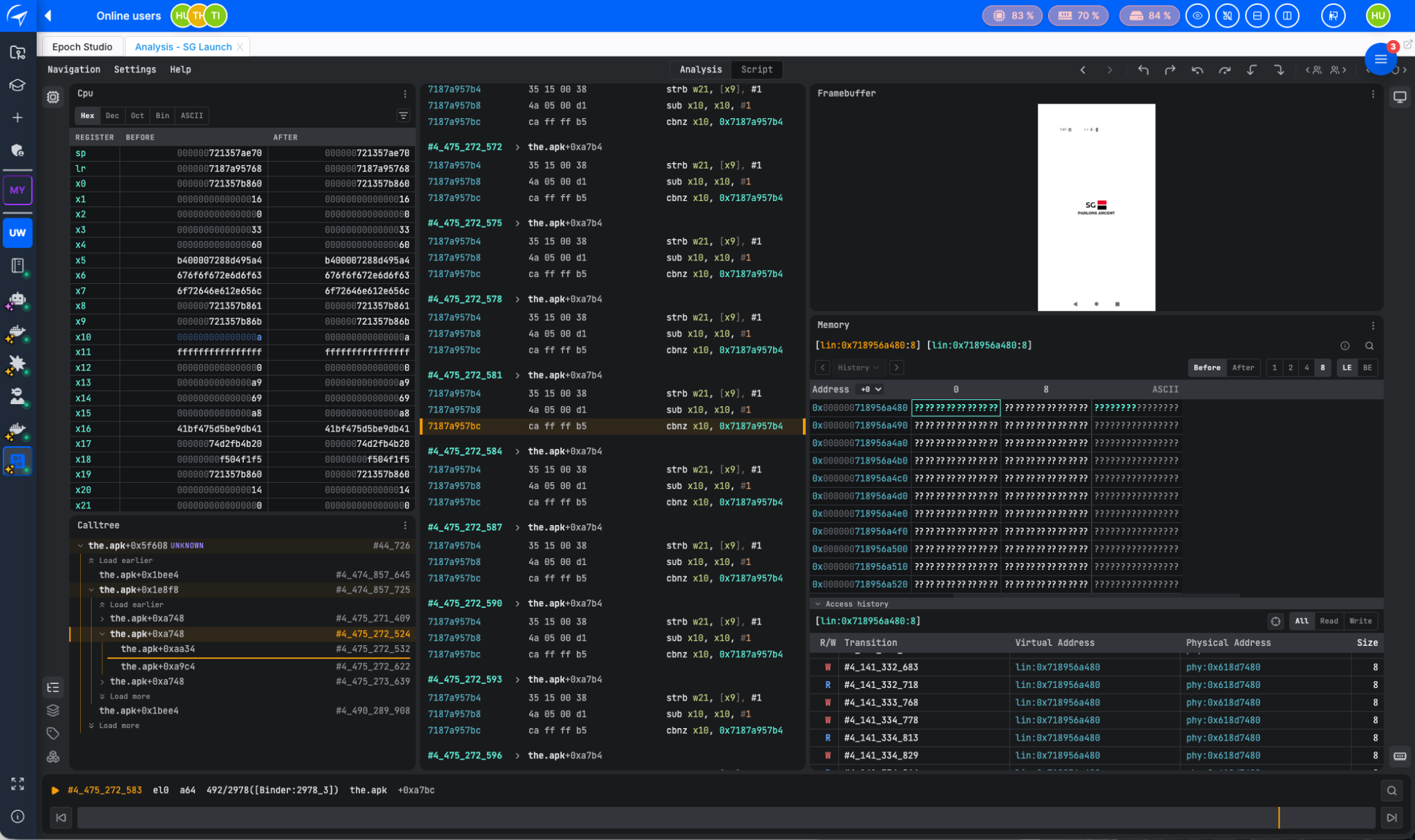
But nobody needs to read the trace sequentially. The trace becomes material that the AI agent can search and investigate. The recorded trace is a file that represents a source of information but also the evidence that can be kept.
For the second experiment, we looked at a more interactive scenario. The application required an identifier and a secret code. The secret code had to be entered using a scrambled on-screen keypad.
We used fake credentials, resulting in the expected "wrong credentials" response.
Again, the complete scenario was driven through prompts:
This trace was far too long and with excessive data into it. We used a feature where we could crop the indexation generating the trace to a chosen part of the sequence. This step was done manually, but upcoming features will soon overcome this with 100% automation.
This produced another full-system trace of approximately 2.33 billion instructions.
The whole purpose is to provide a meaningful material for the AI to explore and manage the compliance. In our case, we provided only both traces and asked the AI to forge a report against OWASP MASVS.
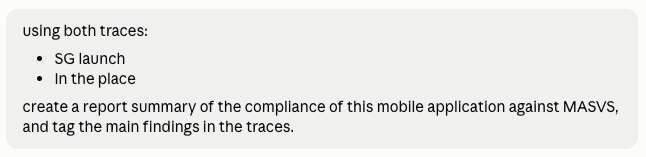
My point here is not to make an exhaustive analysis of the application. But to show that instruction with a language model can lead to valuable analysis across the application execution. Our choice of recording sequence is just an example, but a quality assurance manager may better target which sequence of execution is meaningful to incorporate into the analysis. In this example, we chose to develop a test against OWASP MASVS. Any test campaign can be run to target security verifications or privacy investigations.
Here is an extract, that gives clear findings based on data that are controlled by the user:
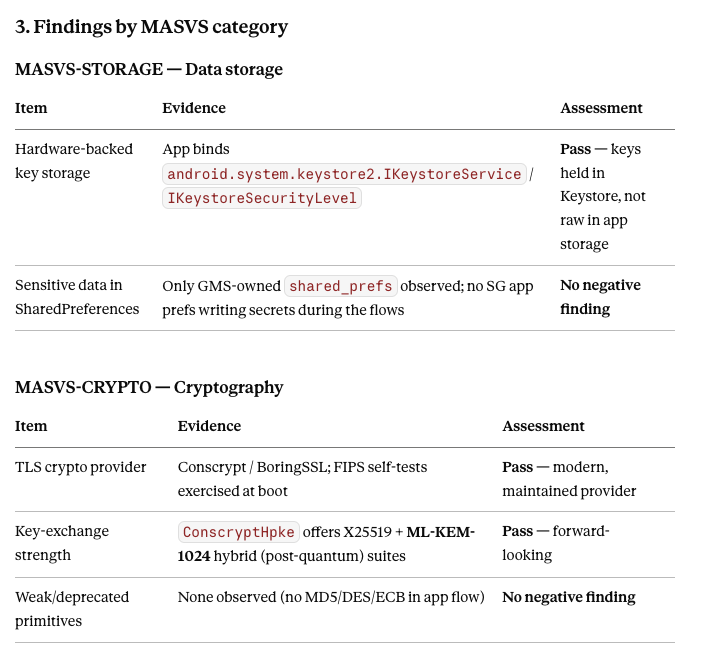
For some tests, there may be a need to go even further, and require specific instrumentation. This is the case typically for the RESILIENCE vector, where a neat verification would require a resource with Frida installed to verify whether the mobile application detects the framework or its execution.
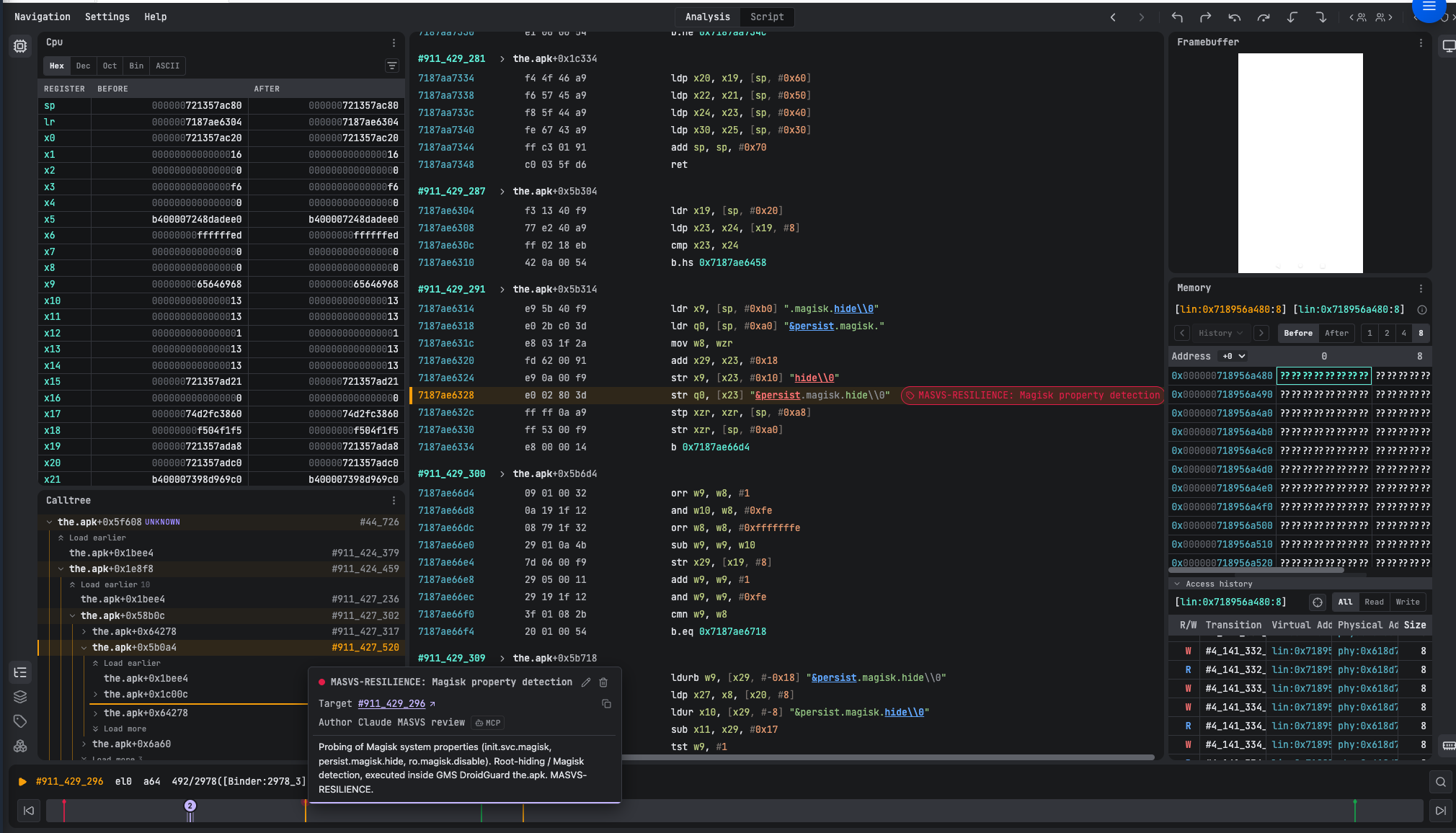
Going back to the trace allows a visual inspection of the testing evidence, by tagging the trace in the interface. This step can be used to collect and keep evidence.
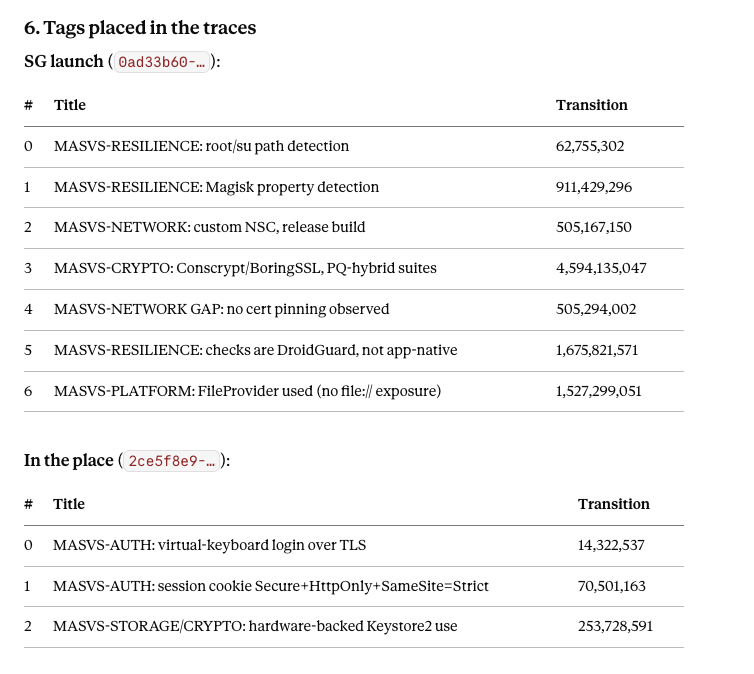
An example of tag is given here:
Traditional security assessments often produce a report. The experts perform the investigation, interpret the results and deliver their findings. If the application owner has another question, it may require another exchange with the testing team or even another investigation.
An AI agent working against a persistent execution trace creates a different experience.
None of this removes the need for deep expertise. Complex vulnerability research, exploitation and unusual protections will continue to call for experienced reverse engineers, and that is exactly where their time is best spent. What changes is everything below that line. The routine, recurring questions you currently send out, what happens to a credential, whether a control really runs, what leaves the application, can increasingly be answered by your own team, in plain language, against a recording of what the application actually did.
For an organisation that assesses mobile applications repeatedly, that shift is the point. It moves the threshold at which outside expertise is required, so the specialist is brought in where they add the most value, not for every routine question. It shortens the distance between a question and a trustworthy answer. And it puts the person who owns the decision back in contact with the evidence behind it, no longer waiting on a report to understand their own application.
This experiment was deliberately narrow: one banking application, two recorded scenarios, a report generated against OWASP MASVS. It does not certify the application, and it is not a substitute for a full assessment. What it shows is a direction, one where you describe the scenario that matters, the application is exercised and recorded automatically, an AI agent investigates the result, and the underlying execution stays available for anyone to verify.
The report is no longer the end of the conversation. It is the beginning of one, with your own application, on your own terms.
In short, we showed that an end to end security verification testing can be performed on an Android mobile application. The whole process can be automated, which means that it can be easily integrated in an internal process, such as a CI/CD. The AI agent provides a convenient interface that mitigates the need for specific skills to run the tests. And finally, the recorded traces using Epoch turn out to be valuable material for the AI agent to manage deterministic investigations with clear evidence.
Deep mobile security analysis used to be something you outsourced. It's becoming something you can do.
This example was developed on an Android mobile application, but the same could be applied in other systems, such as Windows or Linux.
Our team will show you how Epoch fits the way you work.
Want to explore first? Test the Epoch engine at ttd.eshard.com. Free, no sign-up, no credit card.