Tiana Razafindralambo
|
0
|
May 25, 2026


TL;DR: This post walks through analyzing a 7-billion-instruction ARM64 execution trace of Telegram for Android using our EPOCH MCP time travel debugging tool. The objective is not vulnerability hunting: we want to see how well an AI agent can navigate a massive trace and locate everything relevant to the Telegram app, without human guidance. The agent, running deepseek-v4-pro[1m], reads CPU register state, searches memory for runtime strings, and reconstructs the framebuffer from raw pixel data to determine what was happening. The recording starts with Telegram already in the foreground; after a long idle period, a message arrives and the app proceeds to decrypt end-to-end encrypted messages via AES-IGE. The analysis took around 10 minutes on this 7-billion-instruction trace. The post contrasts this with the traditional reverse-engineering workflow (decompilation, disassembly, Frida hooking) and walks through six distinct activities the agent identified, from encrypted chat decryption to SQLite database operations and libyuv image processing.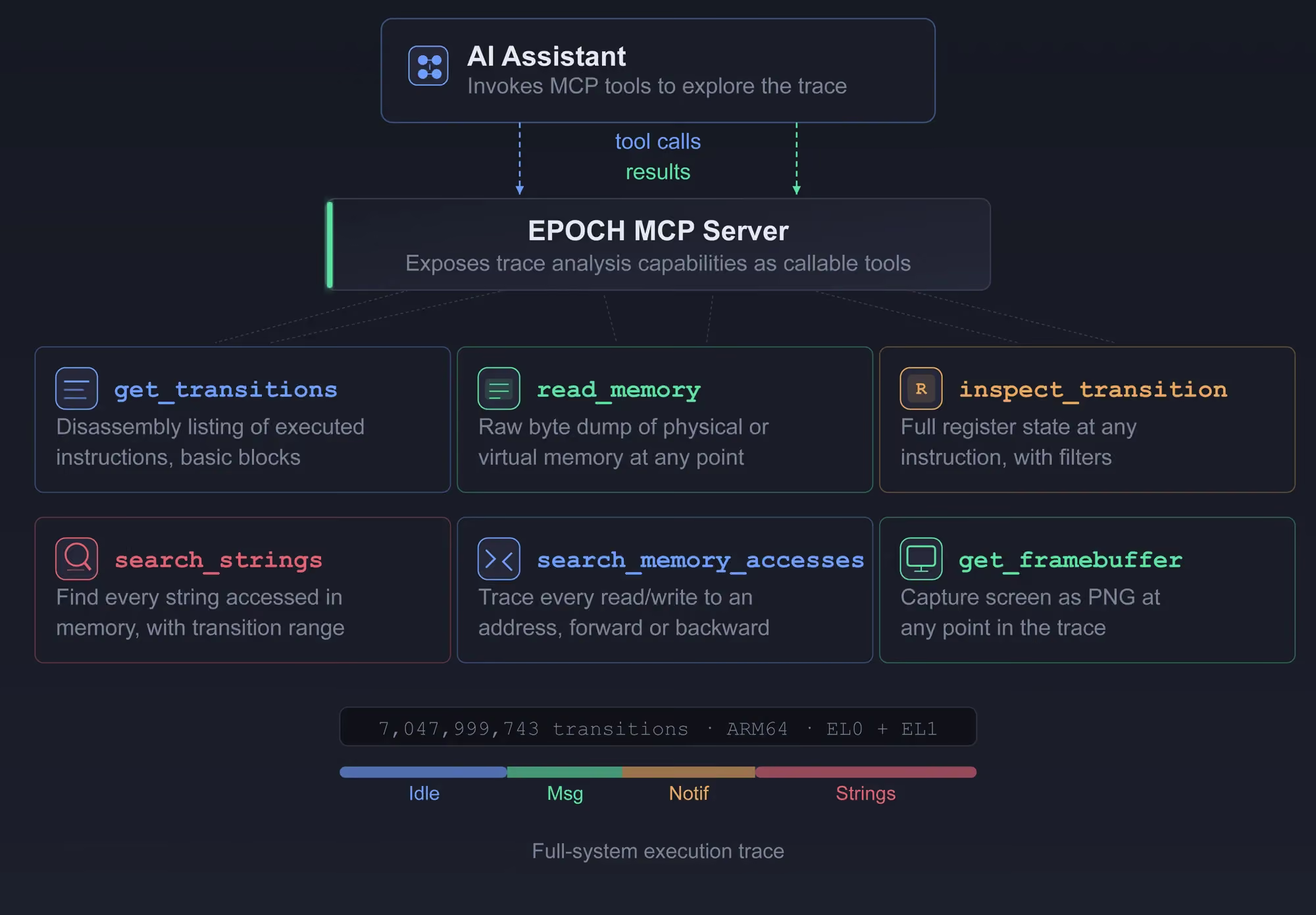
This post is part of a series on using MCP-based time-travel debugging for security analysis. The first post demonstrated tracing a key validation routine across Ring 0 and Ring 3 on Windows. The second post applied the same technique to a VLC Media Player exploit. Here, we turn to the Android ecosystem and an application millions of people use every day: Telegram. If you'd like to discuss this work, come say hi on our Slack.
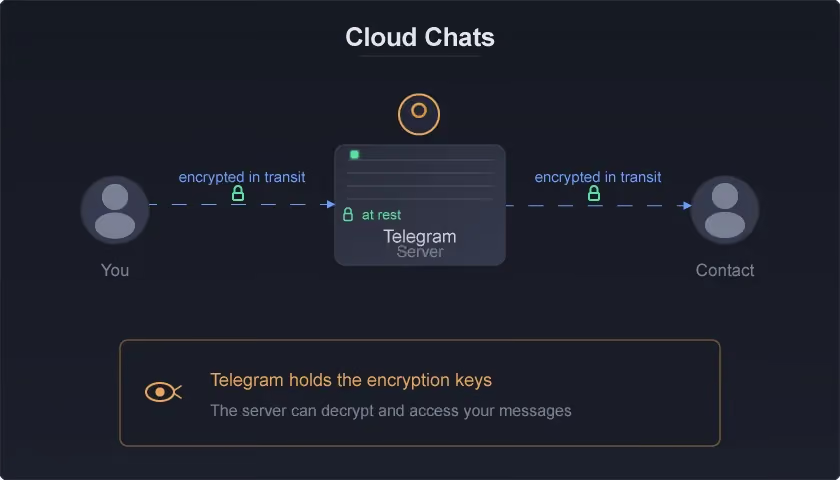
Telegram offers two types of conversations. Regular cloud chats are encrypted in transit and at rest on Telegram's servers, but Telegram holds the encryption keys, so the practical privacy property is that Telegram can access them.
Secret Chats are different: they use end-to-end encryption where only the two devices involved hold the keys. Messages are not stored on Telegram's servers after delivery, though they do transit the infrastructure as ciphertext. Secret Chats are device-specific: they cannot be forwarded, don't sync across devices, and are not available on the web client. If you want to read a Secret Chat message, you must decrypt it on the device.
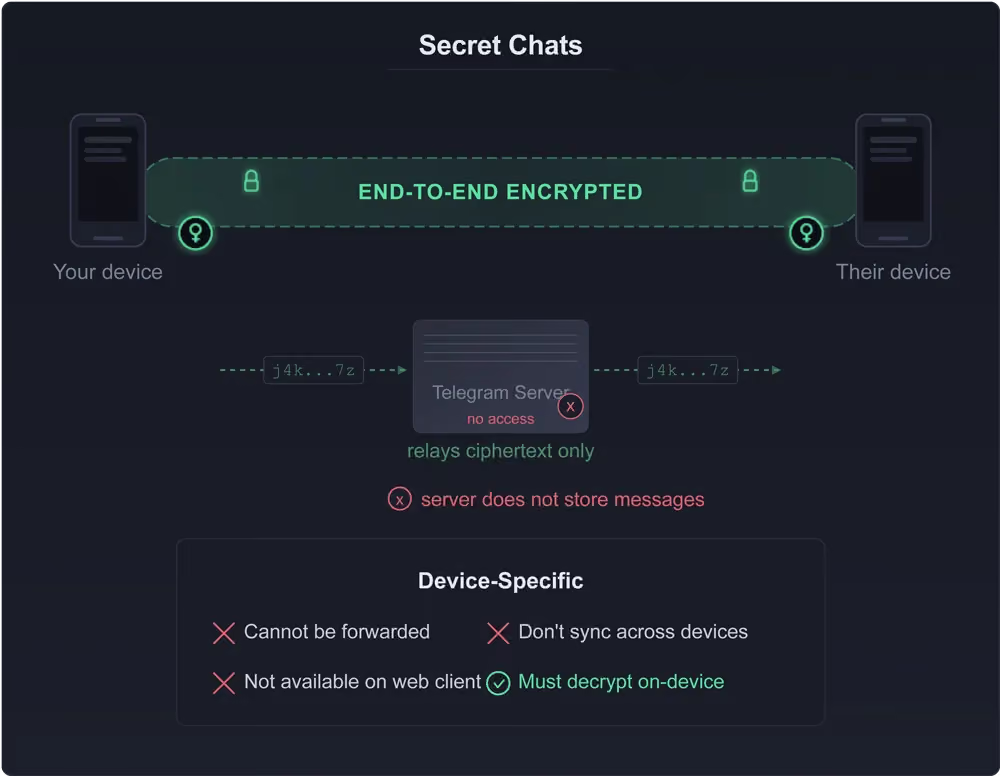
This makes Secret Chats an ideal target for time-travel debugging. The decryption happens locally, inside the Telegram app process, through a specific chain of function calls. If we record the CPU executing that decryption, we can observe every instruction, every register value, and every byte of key material involved, without modifying the app or the OS.
Telegram's Secret Chats use MTProto v2, the protocol's native encryption scheme. The decryption path starts with decryptMessage in the Java layer, runs through a SHA-256 KDF in MessageKeyData to derive the AES key and IV from the message key and shared secret, then crosses into native code via aesIgeEncryption for the actual AES-256-IGE decryption.
Our goal is to see whether the AI agent, given nothing but an execution trace and a set of MCP tools, can follow this chain and confirm that Telegram is doing what the protocol says it should be doing.
Traditional debugging requires you to reproduce a problem: set breakpoints, attach a debugger, step through live execution. Time travel debugging (TTD) inverts this. You record first, ask questions later.
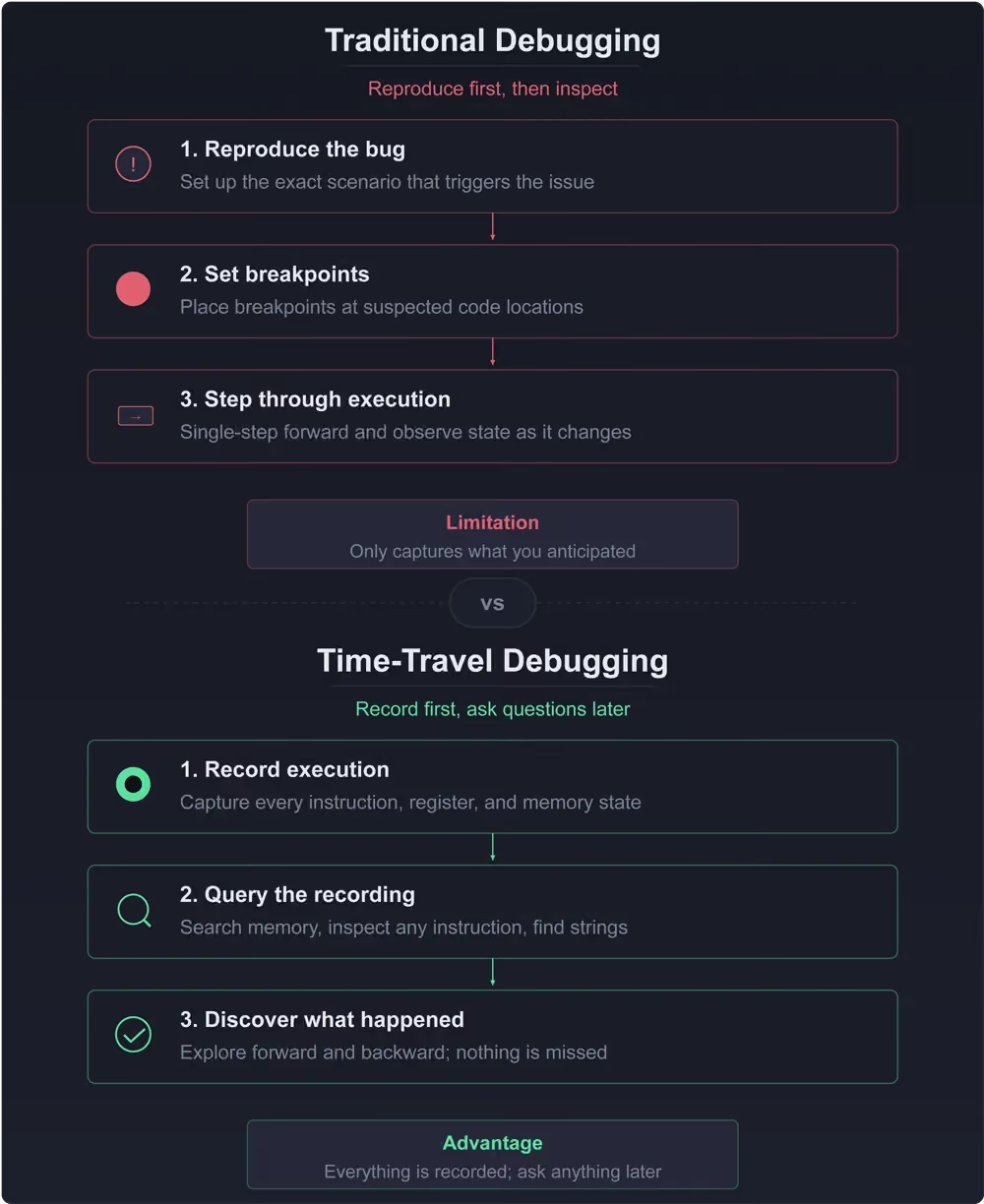
A full-system TTD trace captures every instruction the CPU executed, along with complete register and memory state at every point. Once recorded, you can inspect any instruction, read any memory address, and search for any string or data pattern that appeared at runtime.
Because the trace records what the CPU actually executed, the AI agent works at the ARM64 assembly level. It sees raw instructions, register values, and memory contents. It does not see Java source, Kotlin, or smali. There is no decompilation step, no reconstructed control flow, no guesswork about what a compiler might have emitted.
Through our EPOCH MCP server, this ability to inspect instructions, read memory, and search runtime data is exposed as a set of tools an AI assistant can invoke directly. Among the full toolkit:
.avif)
get_transitions -- disassembly listing of executed instructions, grouped into basic blocksinspect_transition -- full register state at any instruction, with optional filtering by categoryread_memory -- raw byte dump of physical or virtual memory at any execution pointsearch_strings -- find every string that was accessed in memory during execution, with the transition range it was livesearch_memory_accesses -- trace every read and write to a given address, forward or backward through timeget_framebuffer -- capture what was displayed on screen as a PNG at any point in the trace
When the AI model is vision-capable (able to interpret images directly, not just text), it can read text, recognize UI elements, and track visual changes across the trace timeline, effectively seeing what the user would have seen.
This combination is uniquely powerful for reverse engineering. You don't need debug symbols. You don't need source code. You can follow the data: find a string the program printed, trace backward through every instruction that touched that memory, and reconstruct the logic that produced it.
For this Telegram trace, the AI agent used exactly this approach, starting from a log message string, tracing through the notification pipeline, and ultimately landing on AES-IGE decryption in a JNI call.
The trace analyzed here is 7,047,999,743 transitions of an ARM64 Android system, from the app sitting idle in the foreground through message arrival and encrypted message processing. Every claim in this post is backed by a specific tool call against that trace.
Before diving into what the trace revealed, it's worth considering what this analysis would have required without time-travel debugging. The approach described below is just one example of how an analyst might tackle this, not the only way.
A security anlyst approaching the Telegram Android app would start by pulling the APK and running it through apktool or jadx to recover Java source. Telegram's codebase is large, spanning thousands of classes across its networking, crypto, and UI layers. Finding the encryption path means tracing through MessagesController, SecretChatHelper, and Utilities.aesIgeEncryption across decompiled smali, reconstructed Java, or Kotlin, a process that takes substantial manual cross-referencing.
For the native side, the analyst loads libtmessages.so into IDA Pro, Ghidra, BinaryNinja, or radare2. Because JNI exports follow a deterministic naming convention (Java_package_Class_method), the analyst can immediately locate Java_org_telegram_messenger_Utilities_aesIgeEncryption in the binary without searching. That function is the native side of the AES-IGE decryption called from Java.
From there, the analyst traces the AES-IGE implementation, confirming the mode parameters (block size, key length, the IGE tandem-block schedule) and verifying the implementation against the MTProto specification. The function itself is optimized ARM64 assembly that likely calls into BoringSSL. Understanding how the key material and ciphertext flow from Java into this function, crossing the JNI boundary, takes carefull bookeeping in static RE.
Dynmaic analysis adds more friction. The analyst sets up a rooted Android device or emulator, installs Frida, and writes hooks to intercept aesIgeEncryption at runtime. With Frida, hooking it to capture the key material at runtime is straightforward. Without dynamic instrumentation, tracing how the key material reaches it requires crossing the Java-to-native boundary in static analysis.
A Frida hook captures only the data you thought to instrument ahead of time. It won't show you the database writes or the notification pipeline that ran on the same code path unless you anticipated every one and wrote hooks for them.
With time-travel debugging, none of this is necessary. The trace is the ground truth. What took substantial tooling setup and manual cross-referencing becomes a series of data-flow queries against a recorded execution.
From here onward, we follow the AI agent's own analysis of the trace, step by step, with no intermediate human guidance or prompt refinement.
Each finding comes from the agent querying the recorded execution through the EPOCH MCP tools described above.
The prompt given to the agent was:
You have access to an MCP that provides a trace of a Telegram application running. Your task is to understand and explain what is the application doing using the provided MCP. Explain your steps. At the end, provide a write-up about what the application is doing.
Before the interpretation, here are the raw facts from the trace that we can verify independently:
decryptMessage is the entry point for encrypted message handling.Java_org_telegram_messenger_Utilities_aesIgeEncryption is the JNI entry point for performing AES-256 in IGE mode.
The framebuffer was sampled via read_memory at 12 context points spanning the full trace, then reconstructed from raw ARGB pixels. All 6 captures show the same Telegram conversation screen with no navigation away from it.
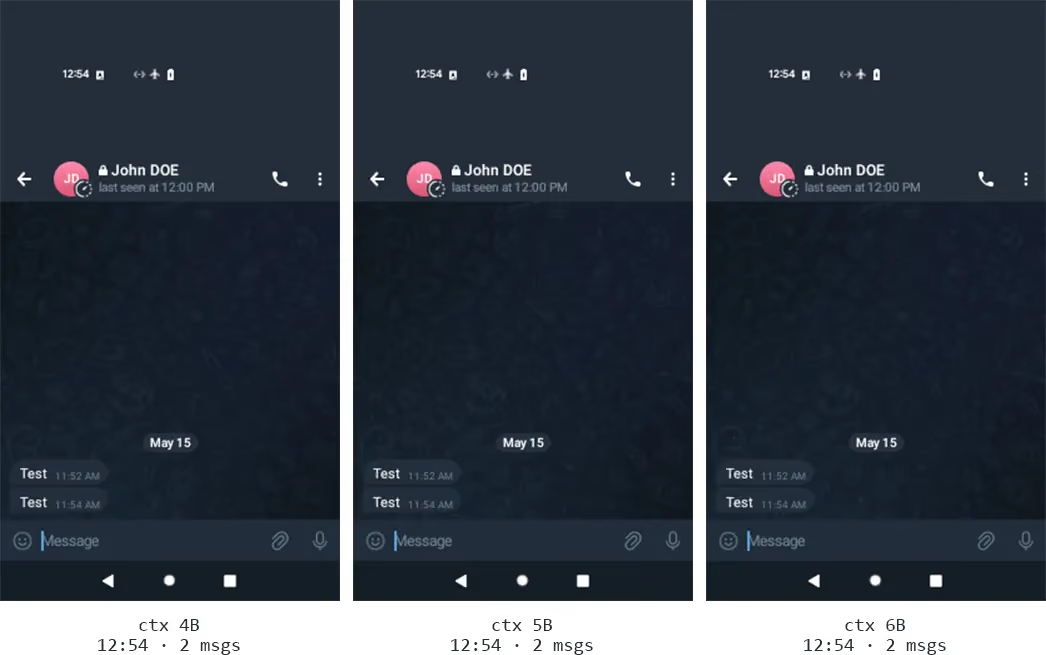
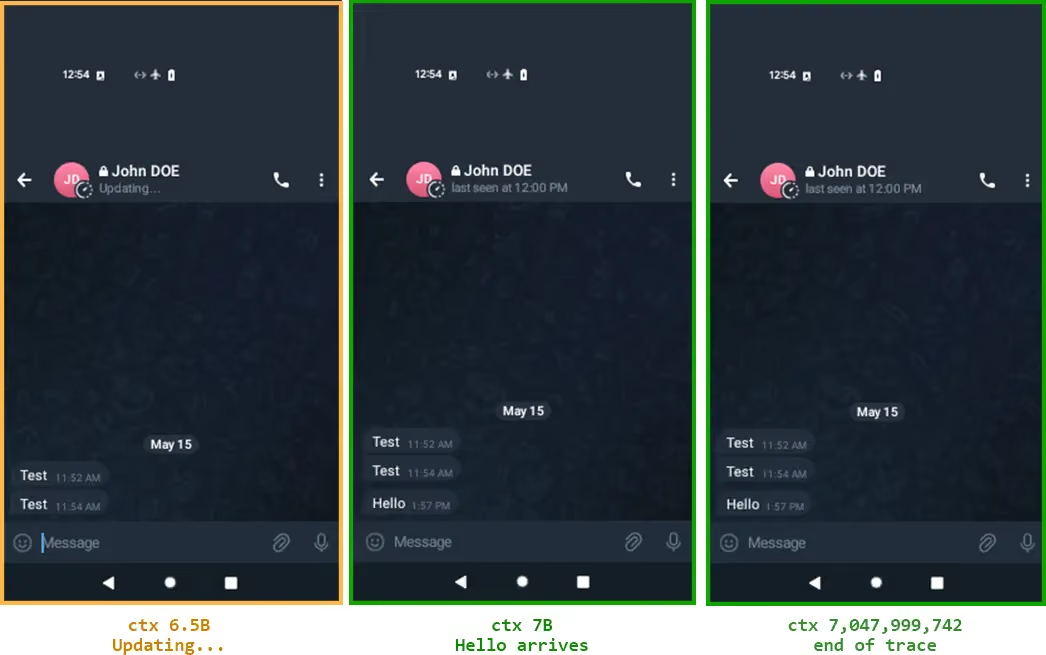
The trace captures Telegram's Secret Chat end-to-end encrypted message processing, including actual AES-IGE cryptographic decryption.
MTProto v2 decryption call chain (verified at specific transitions across the trace):
decryptMessage -- Entry point for encrypted message handlingdecryptWithMtProtoVersion -- MTProto protocol-level decryption dispatcherMessageKeyData -- SHA-256 KDF deriving AES key and IV from msg_key and shared secretaesIgeEncryption -- Native JNI call Java_org_telegram_messenger_Utilities_aesIgeEncryption performing AES-256 in IGE (Infinite Garble Extension) modeAt transition 6,017,719,409, register state captured during JNI symbol resolution:
x0 = 0x74381374D6  → points to string "aesIgeEncryption"
x2 = 0x6e45656749736561  → ASCII "aesIgeEn" (little-endian in register)
x3 = 0x6e6f697470797263  → ASCII "cryption" (little-endian in register)
Secret chat state machine operations observed:
startSecretChat -- Eight async lambda callbacks (lambda$startSecretChat$24 through $31) for secret chat initiation flowprocessAcceptedSecretChat -- Handling accepted secret chat invitationsprocessPendingEncMessages -- Processing encrypted messages queued while offlineTL types resolved (all four encrypted chat state types):
TL_encryptedChat, TL_encryptedChatWaiting, TL_encryptedChatRequested, TL_encryptedChatDiscarded
At transition ~6,036,676,615, the Telegram NotificationsController logs:
NotificationsController: processNewMessages msgs.size()=1 isLast=true isFcm=false)
This indicates the app received and processed one new message via a non-FCM channel. The Android notification pipeline is engaged:
NotificationManagerCompat creates a notification objectandroid.app.INotificationManager binder IPC sends it to system serverNotificationManagerService enqueues it via mEnqueuedNotificationsStatusBarNotification and NotificationRecord are created
SQLite operations on standard Telegram tables:
SELECT data FROM chats WHERE uid IN(-4611686021916387851)SELECT data FROM messages_v2 WHERE ... -- loading messagesREPLACE INTO messages_v2 VALUES(...) -- storing messagesdialog_bar_chat_with_channel for channels 2069585692 and 7614360519"skipped message because chat is already opened (openedDialogId = 4611686021916387851)"
SQL on the enc_chats table:
SELECT admin_id, mtproto_seq FROM enc_chats WHERE uid IN(-805967349)UPDATE enc_chats SET seq_in = ?, seq_out = ?, use_count = ?, in_seq_no = ?, mtproto_seq = ? WHERE uid = ?
Shared preferences file I/O:
/data/user/0/org.telegram.messenger.web/shared_prefs/Notifications.xml/data/user/0/org.telegram.messenger.web/shared_prefs/Notifications.xml.bak
The trace ends inside libyuv (Google's pixel format conversion library, part of Android VNDK). The specific function is I422ToARGBRow_NEON, a NEON-optimized YUV-to-ARGB conversion performing:
fcmgt, fminnm)fcvtzs)shrn, uqadd)zip1/zip2/ext)bsl with precomputed mask tables)
The 272×480 ARGB8888 framebuffer at phy:0x10000000, read as raw pixels via read_memory, contains a Telegram dark-themed chat UI (identified by color value analysis, not visual interpretation):
#242d39 (ARGB byte order; LE word 0x392d24ff).#2a1b13, #2c1d14, #36291c).
How these activities map to the trace phases: activity 1 (decryption) occurs during the Message & Crypto phase; activities 2 through 4 (notification processing and database operations) execute during the Notification Processing phase; activities 5 and 6 (settings persistence and libyuv conversion) fall within the Ongoing Activity phase. The framebuffer is a rendered state at the end of the trace, not a distinct activity.
* In Telegram's data model, negative IDs denote chats and groups, large 64-bit integers are composite dialog keys combining peer type and peer ID, and positive integers identify channels and users. These values are internal database identifiers, not phone numbers or usernames.
The AI agent decided to go through an investigation tree, which is a structured way to map out competing hypotheses about what happened. Each branch represents a different possible answer to the root question. The agent explores each one, gathering evidence to either confirm or close it, until only the supported explanation remains.
Root question: What is the Telegram application doing in this execution trace?
Finding: The trace captures Telegram running in the foreground for ~6B transitions, then MTProto v2 encrypted message decryption via aesIgeEncryption JNI, encrypted chat state machine processing, notification processing for 1 new message, and SQLite database operations on messages_v2/chats/enc_chats tables.
The trace ends in libyuv NEON YUV-to-ARGB conversion, and the framebuffer showencs Telegram's dark-themed chat UI at the sampled checkpoints.
Status: confirmed, AES-IGE JNI entry confirmed at transition 6,017,719,409, decryptWithMtProtoVersion at 6,019,596,061, framebuffer confirmed varied at offsets 0x30000+.
Status: closed, Ruled out by log message "NotificationsController: processNewMessages msgs.size()=1" at transition 6036676615 and verified AES-IGE cryptographic calls. The framebuffer throughout the trace (shown below from end of trace) consistently shows the chat UI already on screen:
Status: confirmed, The org.telegram.messenger.web package uses the full native Android Telegram framework (MessagesController, SecretChatHelper, JNI calls to aesIgeEncryption), identical to the standard Telegram app.
Status: closed, Ruled out by direct evidence. At transition 6,017,719,409, aesIgeEncryption JNI entry confirmed with x2/x3 registers containing "aesIgeEn"+"cryption". decryptWithMtProtoVersion confirmed at 6,019,596,061.
Note on the framebuffer:deepseek-v4-pro[1m]is not vision-capable and therefore cannot read text from aget_framebufferPNG directly. The framebuffer shown in this post was reconstructed programmatically through raw memory reads and ARGB-to-RGBA byte-level conversion, not by visually interpreting the screen. A vision-capable model would be able to perform OCR on the PNG and confirm the on-screen text.
Severity: medium · Type: capability-limited, framebuffer text extraction would require a vision-capable model.
Severity: low · Type: capability-limited, requires single-stepping through async callback dispatch which is infeasible in a 7B-transition trace without more targeted tool support.
Before the analysis began, we established a list of ground truth facts that a human analyst could verify independently. The table below checks whether the AI agent's analysis successfully covered each one, providing a simple accountability measure for the autonomous workflow.
Given a 7-billion-instruction trace and a handful of MCP tools, an AI agent reconstructed the full story in about ten minutes, with no human guidance. Telegram sits idle in the foreground, a message arrives, and the app decrypts it using AES-IGE inside a JNI call — but that's only one of six distinct activities the agent identified. It also found notification processing, SQLite database operations on both regular and encrypted chat stores, notification settings persistence, and libyuv image conversion, all backed by specific transitions and memory reads. No debug symbols, no sorce code, no decompilation. The agent worked purely from the recordded execution: ARM64 instructions, register values, and raw memory.
The point was not to find vulnerabilites. It was to test wether an AI agent, armed only with time-travel debugging tools, could independantly make sense of a massive, noisy trace and surface everything relevant to the target application. It did.
The traditional approach to this analysis would span multiple tools and disciplines: APK decompilation with apktool and jadx, static reverse engineering of native libraries in static analysis tools, dynamic instrumentation with Frida, and manual cross-referencing beetween decompiled Java and optimised ARM64 assembly.
With time-travel debugging, the same questions are answered by querying a recording: find a string, trace backward through memory accesses, inspect the register state at the JNI boundary, and read the framebuffer.
There are limits. The model used here is not vision-capable, so the framebuffer had to be reconstructed byte-by-byte from raw memory reads rather than read visually. A model that can interpet images directly would close the remaining gap , confirming on-screen text and UI state without manual pixel conversion.
This is the third post in our series on MCP-based time-travel debugging for security analysis. If you'd like to discuss this work, come say hi on our Slack.