Mathieu Favréaux
|
0
|
May 2, 2023



We're happy to announce that esReven version 2023.10 has been released!
We designed this version to help our users solve their use cases even more effectively. To this end, its content provides reverserse engineers with all the means to take advantage of esReven's advanced techniques:
Here is a summary of the content of this version:
Need more details about this version? See below:
In this version, we added multiple important features, mostly to the python API:
API - User-defined types: prior to this version, users could read structured data for types already defined in the scenario's PDB files. This feature now allows users to define their own types to use when reading memory from a context.
For example, we can create a struct:
my_struct = Struct(
    StructKind.Struct, 10, "MyStruct", None,
    [
        RegularField("start", 0x0, Pointer(U16)),
        RegularField("value", 0x8, U16),
    ],
)
And we can now read this struct as usual:
>>> data = context.read(LogicalAddress(0xc630005010), my_struct)
>>> print(data)
struct MyStruct /* 0xa */ {
    /* 0x0 */ start : U16* = (...)* @ds:0x7ff64a880000,
    /* 0x8 */ value : U16 = 21440,
}
Note this API supports forward declaration, for circular type references. For example, in the following snippet, struct A contains a reference to struct B, and B to A:
type_resolver = TypeResolver()

struct_a_ty = Struct(
    StructKind.Struct, 10, "A", None,
    [
        RegularField("b", 0x0, Pointer(UnresolvedStruct(StructKind.Struct, "B", None))),
        RegularField("value", 0x8, U16),
    ],
    type_resolver,
)
type_resolver["A"] = struct_a_ty

struct_b_ty = Struct(
    StructKind.Struct, 10, "B", None,
    [
        RegularField("a", 0x0, Pointer(UnresolvedStruct(StructKind.Struct, "A", None))),
        RegularField("value", 0x8, U16),
    ],
    type_resolver,
)
type_resolver["B"] = struct_b_ty
PDB upload:
Users can now upload PDB files from the Python API or the Project Manager's GUI, so these files can be used by esReven. This is notably useful when these PDB files aren't stored on a PDB server, as is the case with code that users compile themselves.
The API entry point is very simple:
pm.upload_pdb("/path/to/local/file.pdb")
Note that PDB files are strongly linked to a specific version of the binary they're built for, so uploading multiple PDBs for multiple versions of the same binary is supported.
API - Binary mappings:
We added an entry point to list all user-land binary mappings that are valid at a point in time, for intance:
>>> list(context.ossi.current_process_mappings())
[BinaryMapping(base_address='lin:0x7ffcf2640000', path='c:/windows/system32/ntdll.dll'),
 BinaryMapping(base_address='lin:0x7ffcf24d0000', path='c:/windows/system32/kernel32.dll'),
 BinaryMapping(base_address='lin:0x7ffcef970000', path='c:/windows/system32/kernelbase.dll'),
...
We can also easily filter on a binary:
>>> m = next(context.ossi.current_process_mappings("ntdll.dll"))
BinaryMapping objects contain all necessary info to fetch the memory, even if the binary is split in multiple ranges:
>>> for r in m.ranges:
>>>     print(f"Mapping {r.address}: {r.size:#x}")
Mapping lin:0x7ffcf2640000: 0x1f0000
Misc
CallSiteValues now expose the transition of the call via call_transition.Replays folder is now mounted in the environment, notably allowing users to manuuly add files to scenarios light_fs if they were missing from the original VM's prepared file system. Doing so, esReven can fetch symbols for these files, either via the binary itself or its PDB files.Along with this release come updates to the subscription-based knowledge modules:
This module gets 2 new use cases that focus on malware-related scenarios, along with an update to an existing how-to:
DG-hAck 2022 - Hack Trick: this use case contains the analysis of a CTF challenge coming from DG'hAck 2022, namely the "Hack Trick" entry. It presents how to:
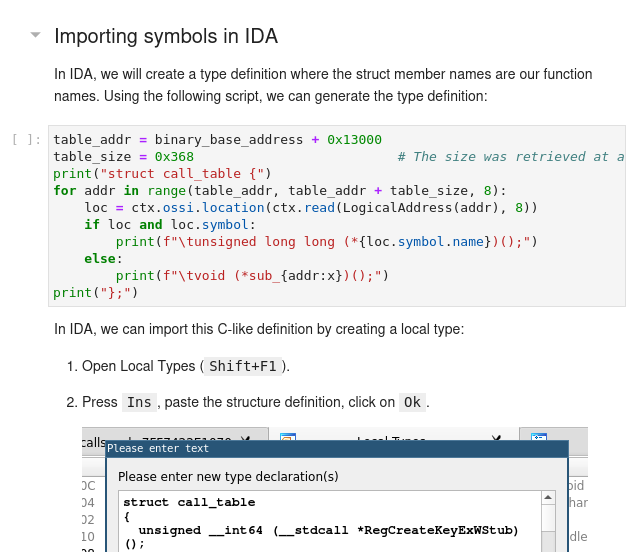
Flare-on 9 - The challenge that shall not be named: this use case presents how we can solve a complex CTF challenge using esReven even in the case of higher-level languages, in this case Python:

Advanced recording: this how-to now bundles a linux tool to approximate the binary recording feature available for Windows guests.
This module gets one new tool:
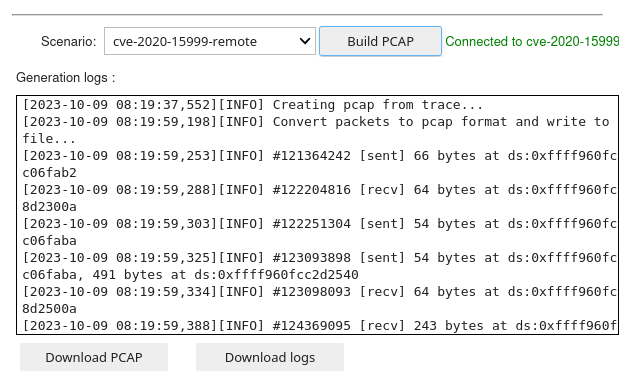
Network Activity: this tool allows user to get the network activity an existing trace, and will produce both a PCAP file and a log file connecting packets to time & locations in the trace.
This tool is an update from the existing dump_pcap tool: it now supports Windows 7, has been made easier to use, and contains the Approach knowledge notebook describing how the structure parsing works in this case.
With this release, the esReven docker image has been updated to the stable release of debian bookworm. This is transparent to users, updating your esReven installation will be done as usual with the upgrade.shscript - see the UPGRADE.md guide at the root of the archive.
The notable differences is that the downloadable Python packages (for Windows and debian) have been upgraded to Python 3.11. Note that the JupyterLab environment still runs python 3.8.
And that's it for this release! You can find the full list of improvements and fixes in the version's release notes.
Interested in knowing more about knowledge modules?
Contact us to get the detailed content of those modules and how to get access to them.
Want to try the product?